Health-RI cBioPortal step-by-step
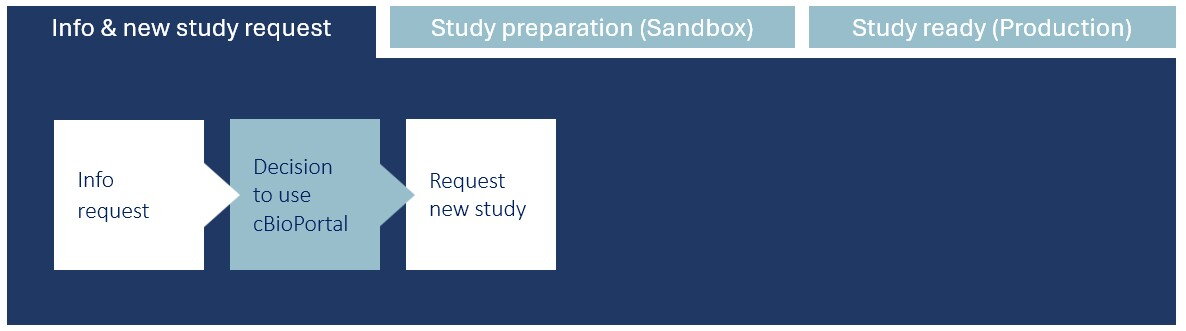
To help you decide if cBioPortal is the right tool for you.
Info & new study request
If you want to know more about whether and how you can use cBioPortal for your research data, please contact the Health-RI Servicedesk.
If you do not yet have an account for the Health-RI Self Service Portal, an account will be created for you, and your information request will be processed accordingly. You will be contacted by a member of the cBioPortal data team, who will gladly answer any questions you may have.
You can view published studies in the public cBioPortal instance by visiting https://cbioportal.org/. For a more in-depth impression of cBioPortal, its application and uses, webinar recordings and tutorials slides are available here.
Following the information request you are free to decide whether to make use of cBioPortal. If you do decide to use cBioPortal, please read the next steps.
Once you have decided that you would like to make use of the Health-RI cBioPortal for your data, you can fill in the ‘cBioPortal New Study request’ form via cBioPortal Request New Study page of the Health-RI Self Service Portal.
Study preparation (Sandbox)
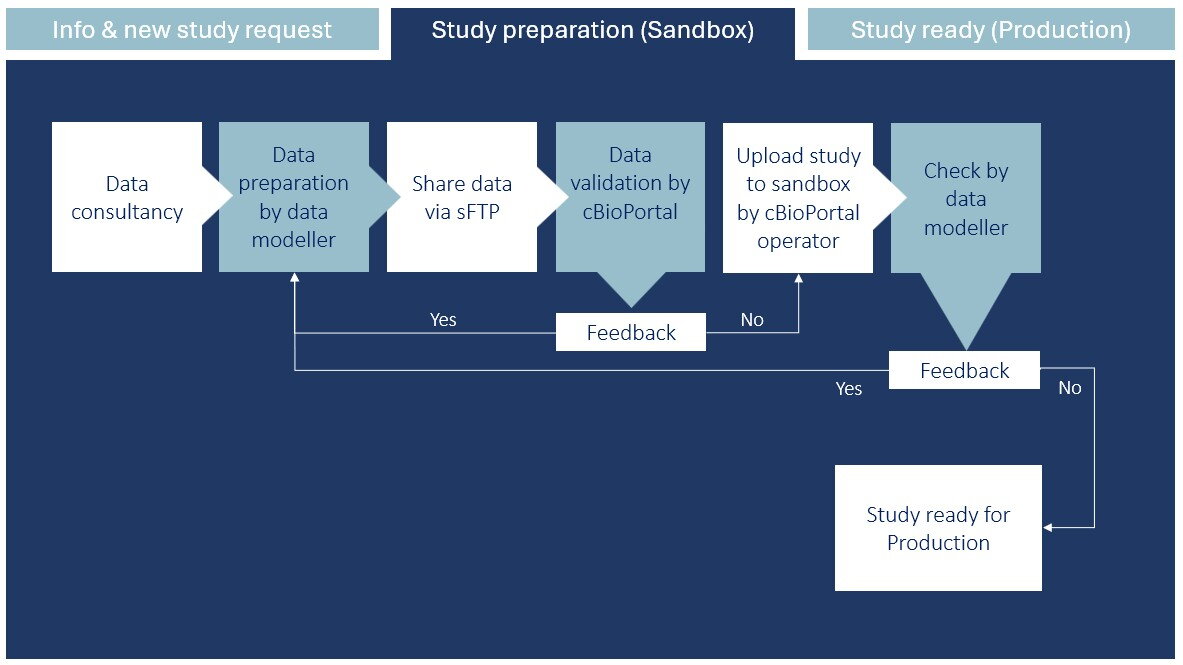
This is the moment to discuss if, and in which manner, your data types can be imported and modelled in the cBioPortal data-integration platform to view, query and analyse the available data. It will also be discussed which steps need to be performed by the the data modeller*, and which steps will be performed by the Health-RI cBioPortal operator.
* In most cases, the data owner such as the PI assigns a data modeller involved in the study to perform the data preparation steps instead of preparing the data themselves.
All information regarding file formats can be found on the cBioPortal data requirements webpage. Please click on the data types that are applicable to you (e.g. segmented data, mutation data etc.). Prepare cBioPortal-ready files according to the instructions available in this link.
If you wish to see examples, you can find public studies by visiting the public cBioPortal website. The data preparation files for these studies can be found here.
As an example, in the MSK-IMPACCT study, clinical, CNA and mutation data has been uploaded for 10.000 patients. Here, you can see how the data files were prepared for the upload, based on the requirements set by the cBioPortal data requirements webpage.
Once the data has been prepared, the data should be transferred in a safe and secure manner using the Health-RI secure File Transfer Protocol (sFTP). An account for the sFTP, in case you do not have one already, can be requested via the Health-RI Self Service Portal.
To request an sFTP account for file transfer, login into the Health-RI Self Service Portal, select ‘Services and Request Forms’ and scroll down to ‘cBioPortal’ and click on ‘request sFTP account’. After the request has been made, you will receive login details and a manual explaining how to set up and use an sFTP client like FileZilla or Cyberduck to transfer the files directly to the safe environment of the Health-RI cBioPortal operators.
After uploading the data, please contact your assigned Health-RI cBioPortal operator via your ticket number so the next steps can be performed.
After the Health-RI cBioPortal operator receives a notification that data has been delivered to the sFTP, they will make an internal working directory for your study on the secure ETL server (Extract, Transform and Load). In this working directory, initial data checks are performed to make sure the data is ready to be loaded to cBioPortal.
The data checks include investigating whether the data has been delivered correctly according to the data requirements document (see ‘Data Preparation by data modeller’).
In case errors are found in the data, feedback will be provided by the cBioPortal operator to the data modeller. Small issues which do not require significant work will be taken care of by the cBioPortal operator. Errors such as missing required fields are errors that the cBioPortal operator often cannot solve by themselves. In these cases, you – the data owner/modeller – will have to correct the data in the files with the feedback provided by the cBioPortal operator. The feedback will be accurate enough for you to spot and fix the problem.
The cBioPortal operator will send out an update when the data was received in good order, and that the next steps can be taken.
After the data has been checked and all the files are in order, the cBioPortal operator will upload the data to the Health-RI sandbox cBioPortal server. This is a stable and secure cBioPortal environment with the purpose of modelling your data. Data holders and data modellers will have the opportunity to review how their data appears once it has been loaded in cBioPortal and to do some final checks.
After the data has been loaded to the Health-RI cBioPortal sandbox server, the initial load result is checked by the cBioPortal operator. The cBioPortal operator will explain what to improve to the data modeller in case anything went wrong with the upload (see the ‘Feedback’ section below).
Besides, the data modeller is granted access to the study on the Health-RI cBioPortal server so that they can review the study. In order to login, the data modeller is required to have either a Google account, or a Google-linked account, e.g. associated with your institute email address (see more info here).
If everything went correctly, the data owner will be notified (see next phase: Study ready (Production)).
Do you have any feedback on the study as it is currently displayed ion the Health-RI sandbox cBioPortal server? No problem; the cBioPortal operator is glad to help the data modeller with incorporating the feedback into the data loading process.
Note that extensive changes to the data mapping or to the source data might also require the data modeller to adjust the provided data.
Study ready (Production)
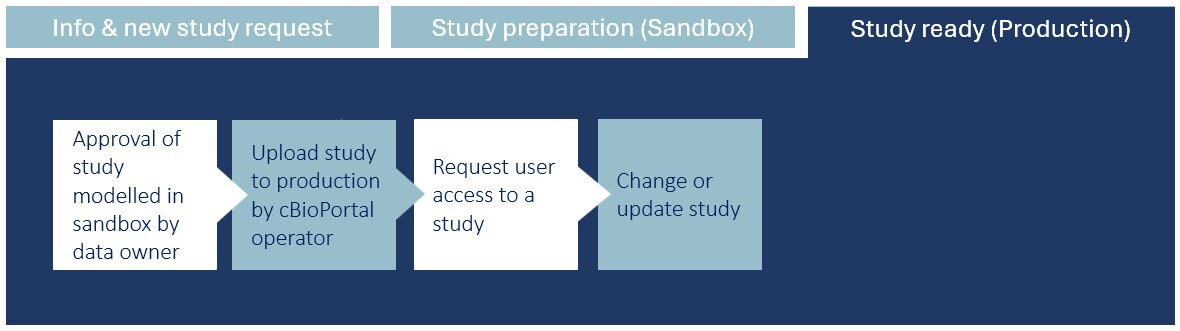
When the modelling has been performed correctly for all data types, the data owner/modeller will inform the cBioPortal operator that the study is ready to be uploaded to the cBioPortal production server.
The cBioPortal operator will transfer the study from the sandbox Health-RI cBioPortal server to the production Health-RI cBioPortal server. By default, access will be given to the data owner and data modeller, and a notification will be sent. You can now make use of your study in cBioPortal.
Access to the study can be requested by others. They can contact the Health-RI Servicedesk if they don’t have an account for the Health-RI Self Service Portal yet. Inside the Healht-RI Self Service Portal, they should first request access to the Health-RI cBioPortal platform (cBioPortal Request New user). Next, they should request access to the study of interest via Health-RI Self Service Portal (cBioPortal Request User Access To Existing Study). If the user has already an Health-RI Self Service Portal account and access to the Health-RI cBioPortal platform, one should fill in the last-mentioned form only. Please make sure you select the correct study name, the correct environment (production) and the correct role.
Once your study is on the Health-RI production cBioPortal and the data owner wants to update the study, please fill in the cBioPortal Update Existing Study form on the Health-RI Self Service Portal. Here you can specify whether the update is concerning adding new data types (data types can be found here) that were not included before, new variables to already present data types, new patients/samples or to fix error(s) on the data.
An overview of users with granted access to your study will be sent yearly to the data owner. This way, the data owner can check whether this overview is still up to date, or that some users might need to be removed or added to the study.