
Setting up XNAT
Steps to get a study up and running in XNAT
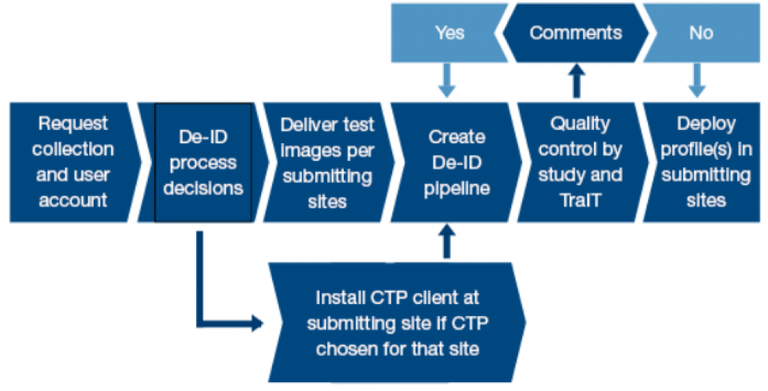
Preparation phase - XNAT
To start using XNAT for your study, images have to be uploaded to a new project. To do so, you first need to request a new collection and user accounts.
If you have a Health-RI servicedesk account
- Login to the Health-RI Self Service Desk.
- Fill out and submit the request form: 'XNAT New Collection Request' for XNAT. This request also includes an account for the person who will manage the XNAT project on the Health-RI server and receives the role of Collection Administrator by default. This collection administrator (study coordinator) has also a coordinating role to set-up the study.
If you don't have a Health-RI servicedesk account
- Please send an e-mail (preferably via the following link) to servicedesk@health-ri.nl and request for a user account on the XNAT and Health-RI Self Service Desk.
- After you have received your account information, please login to the Health-RI Self Service Desk.
- Fill out and submit the form: 'XNAT New Collection Request' for XNAT. This request also includes an account for the person who will manage the XNAT Collection on the TraIT server and receives the role of Collection Administrator by default.
The study coordinator will receive a variety of documents to guide the procedure, a.o. a responsibility document that shows, per step, who is responsible (if Health-RI or PI) for its execution. Because most probably for each of the steps there will be different people delegated to execute it, we would request the coordinator to fill in the names of these contact persons (e.g. local CTP administrator) and send it back to Health-RI.
If you want to add more users in the study you will need to fill out either the "XNAT New User Request' (for a XNAT study) forms in the Health-RI Self Service Desk.
Not every research study and hospital is the same. Therefore, there are several decisions which need to be taken upfront. These decisions can be split into organisational and technical, as explained below.
Organisational decisions
These decisions are mostly influenced by the processes and collaboration efforts of participating centres in your study.
Collecting imaging data: upload directly or collect centrally before upload?
As a coordinating centre, the first question is whether you want to collect all data before uploading, or to have centres upload the data directly. The first option gives more control and overview for the coordinating centre. Whereas the second option is faster in terms of data transfer, however it introduces more work and responsibilities for participating centres. Our experience is that direct upload by participating centres is preferable, as data upload can be integrated in the participating centre’s workflow. We are aware that installation of software in local hospitals is often cumbersome and not always feasible. Therefore, the option for de-centralised upload is often difficult or not possible.
Installation of upload tool in participating centres
Irrespective of the previous decision (upload directly or central collection), centres that wish to upload data need to install the de-identification software (called CTP).
If participating centres wish to only upload a few patient images at a time, Health-RI is evaluating a alternative solution where CTP does not need to be locally installed. Please contact us to discuss this option.
Technical Decisions
These decisions are mostly influence by the needs of the study regarding the information that is kept in the uploaded files after de-identification and can be guided by Health-RI.
Using one strict or multiple tailored de-identification profiles?
De-identification profiles need to be set-up. Although the DICOM standard defines the structure and placeholders (tags) for metadata, it also supports additional (non-standardised) additional information. This non-standardised information can be different for different manufacturers, modalities (e.g. CT/MR/PET scanners), or even software versions of the same modalities.
To be sure that XNAT does not contain patient-related information (retrieved from the DICOM metadata), we can support the creation of de-identification pipeline. In general, we provide a generic (strict) anonymisation pipeline (compliant to DICOM supplement 142, following HIPAA laws) which should be applicable to every study. The downside of this strict pipeline is possibly the loss of detailed information specifically needed for certain research questions and / or data management. Many patient-related information (e.g. weight) is missing, which limits applicability for research questions. For example:
- Computation of PET Standard Uptake Values (SUV) or DEXA or MRI measures of body composition, which are based on body weight, body surface area or lean body mass.
- The data stored in private tags by some vendors are required for specific image analysis. E.g. for PET-Scans from Philips two private tags needed to be preserved for a particular study.
To overcome these problems, we support tailoring of anonymisation profiles, however this means that every submitting site must have it’s own, tailored anonymisation profile. This propagates into the next steps, as several tasks should be done for every participating centre (e.g. defining de-identification profiles). This means that the study could incur in costs.
As a standard, Health-RI requests studies to follow a standard de-identification policy. It is up to the study to define variations to this policy, and justify these choices
The steps to define and implement the de-identification profile are described below:
| # | Short description | Actor | Long description |
| a) | Define patient id replacement | Study coordinator | Decide which option to use: - CTP look-up-table |
| b) | Create CTP collection de-identification template | Health-RI | Create CTP collection de-identification template based on the approved Collection De-identifcation profile |
| c) | Implement patient id replacement | Submitting site | Implement patient id replacement in CTP |
| d) | Implement CTP collection de-identification template | Submitting site | Implement CTP collection de-identification template based on the provided CTP collection de-identification template |
| e) | Clean burned pixel data | Submitting site | |
| f) | Random visual inspection | Submitting site | (Random) visual inspection of tags for each submitting site |
If the strict pipeline does not comply with the needs of the study, the following also needs to be done:
| g) | Define collection de-identification profile | Study coordinator | Define deviations from DICOM-142 supplement |
| h) | Approve collection de-identification profile | Principal Investigator | Approval of collection de-identification profile |
| Repeat steps a-f |
Depending on Health-RI's involvement and effort in the implementation of these deviations, costs may be incurred by the study. For more details, see XNAT's Freemium and Fair use policy.
In principle this step can be skipped, but in the case where Health-RI servicedesk needs to provide support with development of the de-identification profile (a set of rules how to edit the DICOM header tags), we need a set of test images which are similar to the actual study images. Preferably, this should be a phantom scan, using the scan protocol used for this research study. If no phantom can be made (or is available), please contact us for an appropriate solution.
For the delivery method of data, we prefer to use solutions provided by the hospital itself. If not available, please contact the Health-RI servicedesk at servicedesk@health-ri.nl.
The Clinical Trial Processor (CTP) is the proposed tool for de-identifying and submitting imaging data. Every submitting site needs to install CTP locally to submit images to XNAT.
CTP is a stand-alone Java client program (developed by the RSNA) for de-identification and submission of imaging data to a central archive. CTP has the following key features:
- Easy installation.
- Support for multiple pipelines.
- Processing pipelines supporting multiple configurable stages.
- Support for multiple quarantines for data objects which are rejected during processing.
- Pre-defined implementations for key components:
- HTTP / DICOM Import
- DICOM Anonymizer
- HTTP(s) / DICOM / FTP(s) Export
- Web-based monitoring of the application's status, including configuration, logs, quarantines, status
More information is available from the RSNA.
A couple configuration templates are available on our GitHub, namely a strict anonymiser according to DICOM 142 standards, and a customised profile.
CTP needs to be installed at each site wishing to submit images to XNAT. Images are then sent to a central CTP server, which then directs them to XNAT.
See SOP “Install CTP” for the step-by-step instructions.
A variety of sites already have a working CTP client. Please contact us via this e-mail for more information on the sites we know are using CTP, and the respective contact persons. Please let us know for which site you are wishing to obtain this information.
To support development of tailored de-identification pipelines, for both central and local software installation, Health-RI servicedesk can deliver support in building this pipeline. Development of a de-identification pipeline is an iterative process, as explained below, based on the delivered test images.
1. Setup of pipeline
As a first step, we will set-up a generic pipeline for local testing purposes. This pipeline will receive images, apply a de-identification profile, and store the de-identified images locally.
As de-identification profile, we will start with either
- the strict profile,
- a profile used in a previous study of the participating center, or
- from another participating center within the study.
Afterwards, we will use the delivered test images for de-identification, and assess the anonymisation.
2. Assessing and modifying de-identification profiles
After the 1st round of de-identification of the test images, we will inspect the de-identified images (random inspection of one slice per DICOM series) and check for non-processed personal information, both for public (standardized) and private (non-standardized) DICOM metadata.
If personal information is still present, we will add removal or modification rules to the de-identification profile. Afterwards, we will again process the originally delivered test images using the modified pipeline/de-identification, and re-assess the results as explained above.
3. Send test images to XNAT
After the process in task 2 is completed, we will export the delivered test images in de-identified form to XNAT, in the target collection for the specific research study. This is the entry point for the iterative process as shown in the preparation phase page. For the next step, the study coordinator and/or data analyzer will be asked to download the images from XNATand conduct the analysis as performed within the study.
Before you can upload the images of a new study on the production server you will have to test whether the uploaded images meet the requirements for the study
Please check the following
- have the test images been uploaded to your XNAT project?
- have the test images been de-identified according to the outcome of step "Create and test de-identification pipeline"?
- are the images usable for the envisaged research purposes?
Health-RI requires that you thoroughly test uploading and de-identification and also test data export from XNAT in the format that is needed for research.
Testing is essential to avoid late-stage problems. Health-RI can give advice on how to avoid exporting/analysis problems, but will not unconditionally fix the problems after-the-fact if not consulted before the start of the study.
Make sure that potential problems are identified at an early stage and discuss these with Health-RI. This will enable Health-RI to support you with data export and analysis in the production environment.
When there are no more comments, and the profile (for a specific participating centre) is agreed upon, the pipeline (and specific profile) can be deployed in the local centre via the local CTP installation to send real study images to XNAT
Although we can help setup the pipeline upon request, final installation and maintenance in local hospitals is not part of our support. This should be handled by the local department or central IT department (dependent on the infrastructure and policies of the hospital). We can support local IT in case of technical questions and to deliver the pipeline as configured for this study, however access to the local CTP installation and maintenance is the responsibility of the local IT contact person. This contact person can also help with further questions regarding connections to local clinical systems (e.g. PACS or imaging workstations).
This deployment process needs to be conducted in all participating centres uploading imaging data, as decided upon in the original decisions step.

Execution phase - XNAT
During this step the images are uploaded by the participating sites in the XNAT Project
Images should be uploaded via the CTP software installed in the participating site, which is managed by local IT of the participating site.
Initially, the predefined de-identification profile will be used to upload the images to XNAT.
New users for the study can then be requested by the PI or delegate from the study by filling the "XNAT New User request" request form available in the Health-RI Self Service Desk.
There are different user roles within XNAT. The roles at study level are:
- Owner - Full Access
- Member - Full access except deleting
- Collaborator - Only read access
For custom access rights per sight ask the Health-RI Service Desk.
The study coordinator is responsible for the management of the XNAT project during the execution phase.
The tasks for this person includes amongst others the following:
- Monitor the usability of the uploaded images for the envisaged research purposes
- Modify the de-identification profile when required
To avoid late stage problems it is very important to test changes of an ongoing study (e.g. modifications of the de-identification profile). When testing is neglected, it could cause serious problems after years of data collection!
XNAT allows for more than just archiving, viewing and downloading of images. Through the REST API additional functionality can be implemented allowing for more advanced analysis of the data, as well as adding additional meta-data to your project. Read more on the BBMRI website on examples of extended use of XNAT.
It is common practice for clinical trials to include a plan for interim analyses of the data, and to monitor safety.
During execution phase, we would advise to perform interim analyses. These analyses assess the quality and format of the data collected.
If you want to perform an interim analysis you need to export data from XNAT, as done in the data extraction step in the completion phase.

Completion
Data cleaning is the process of detecting and removing corrupt or inaccurate images.
Quality control should begin before the actual images are uploaded and continue until the end of the data collection process. Images in XNAT are not editable. They can only be removed by the collection administrator, or flagged as "questionable" or "unusable for analysis".
Data extraction can be done at different time points during a study, on different subsets of images.
Image subsets can be downloaded from XNAT using different methods:
- the XNAT interface
- XNAT desktop client (desktop-client)
- scripting using REST API (xnatpy)
When data is no longer being collected in XNAT and all outstanding queries have been resolved, then direct access to the study data is either no longer required or limited to occasional read only access
All study data will remain on the XNAT server and therefore there is no need for archival to disc or to another system. This could nevertheless be considered.
In the unlikely event that this policy is changed, it will be guaranteed that study data are provided to the PI of the study in an open file format (e.g. DICOM).